The k0s Family
The k0s family is a set of open-source projects built around k0s, a lightweight Kubernetes distribution. Together, they cover the full spectrum of cluster management: from spinning up a local single-node cluster to declaratively managing a fleet of workload clusters across multiple infrastructures.
The family consists of four members:
- k0s: lightweight Kubernetes distribution
- k0sctl: manages k0s clusters lifecycles
- k0smotron: runs control planes inside Pods
- k0rdent: manages multiple Kubernetes clusters
k0s
k0s is a certified Kubernetes distribution originally created by Mirantis. It is a CNCF Sandbox project. Its main selling points are simplicity and portability: k0s ships as a single binary with no OS dependencies, which makes it easy to run on bare-metal, edge devices, VMs, or any cloud infrastructure.
Getting started
Getting a local cluster up and running only takes a few commands:
# Download the binary
curl -sSf https://get.k0s.sh | sudo sh

# Install the service (acting as both control-plane and worker)
sudo k0s install controller --single

# Start the service
sudo k0s start

# Access the cluster
sudo k0s kubectl get node
That’s it — a fully functional single-node Kubernetes cluster, no extra tooling required.
k0sctl
k0sctl is the CLI to manage k0s cluster lifecycles. It takes a declarative configuration file describing your hosts and desired cluster state, and handles the rest: installing k0s, bootstrapping the cluster, and keeping it up to date.
Deploying a multi-node cluster
Start by generating a default configuration:
k0sctl init --k0s > cluster.yamlEdit the file to match your infrastructure — in this example, one controller and one worker reachable over SSH:
apiVersion: k0sctl.k0sproject.io/v1beta1
kind: Cluster
metadata:
  name: k0s-cluster
  user: admin
spec:
  hosts:
  - ssh:
      address: 192.168.64.35
      user: ubuntu
      port: 22
      keyPath: /tmp/k0s
    role: controller
  - ssh:
      address: 192.168.64.36
      user: ubuntu
      port: 22
      keyPath: /tmp/k0s
    role: worker
  k0s:
    version: v1.34.1+k0s.0
    config:
      ...
Then apply it:
k0sctl apply --config cluster.yamlk0sctl connects to the hosts over SSH, installs k0s, and bootstraps the cluster. The result is a fully operational cluster with fine-grained control over its configuration.
k0smotron
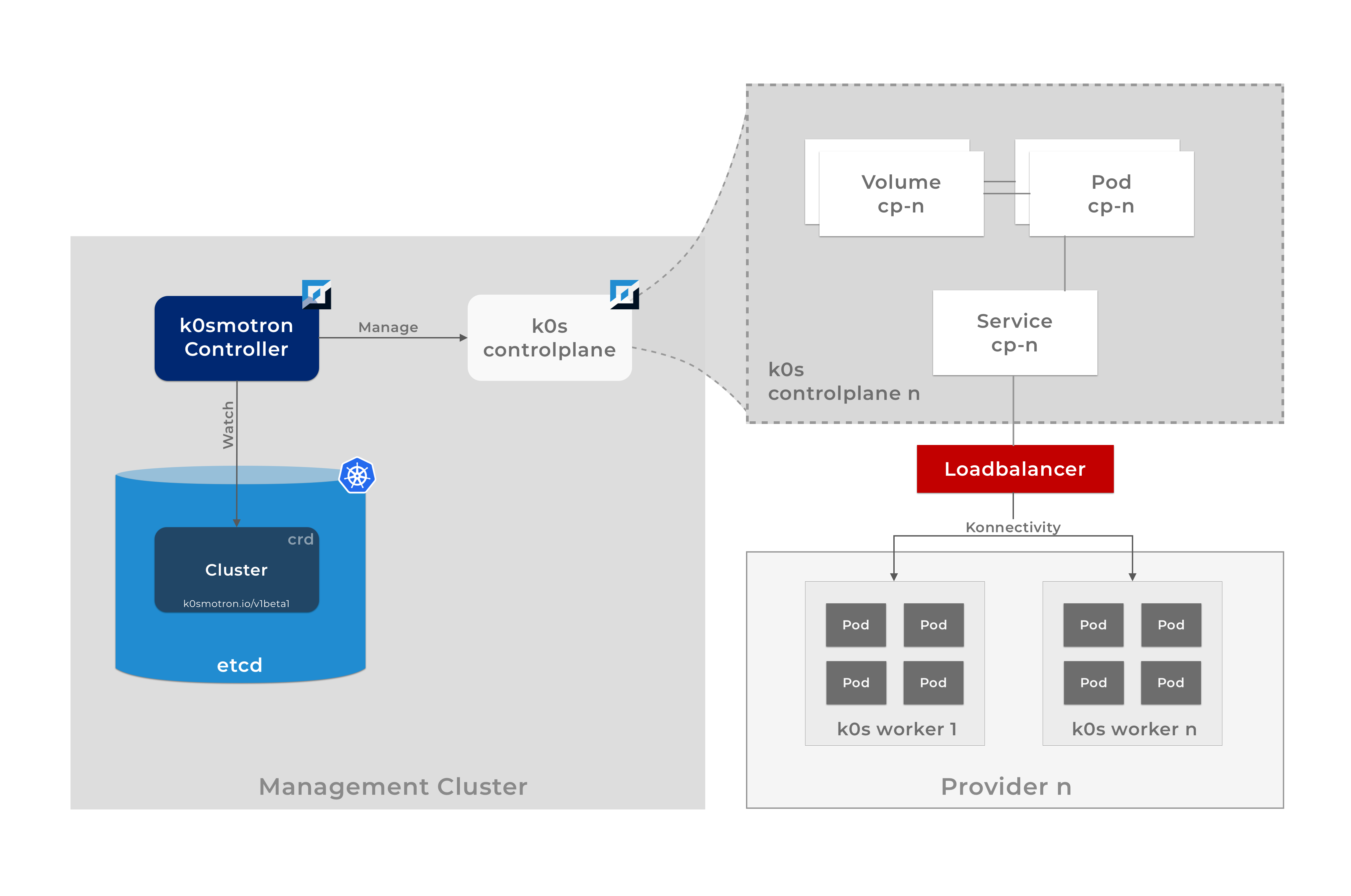
k0smotron takes a different approach: instead of running the control plane on dedicated machines, it runs k0s control planes as Pods inside an existing Kubernetes cluster (the management cluster). Worker nodes can then be attached from any infrastructure: on-prem, cloud, or edge.
This means the control plane and workers are fully separated, which unlocks a lot of flexibility: you can have workers on different clouds, or even on bare-metal, while the control plane is centrally managed.
k0smotron is also a Cluster API (CAPI) provider, meaning you can manage it using the standard Kubernetes Cluster API.
Architecture
Cluster API overview
Cluster API (CAPI) is a Kubernetes project that lets you declaratively manage workload clusters from a management cluster. It defines core CRDs (Cluster, MachineDeployment, Machine, …) and relies on provider implementations for the actual infrastructure work.
A Cluster resource references two providers:
- a control plane provider responsible for creating and managing control plane nodes
- an infrastructure provider responsible for the high-level cluster configuration (VPC, subnets, …)
A MachineDeployment references:
- a bootstrap provider specifies how each worker machine is initialized (via cloud-init)
- an infrastructure provider responsible for creating the actual worker machines
k0smotron can act as the control plane, bootstrap, and infrastructure (via RemoteMachine) CAPI provider covering most of what you need in a single project.
Example: control plane in a Pod, workers in Docker
apiVersion: cluster.x-k8s.io/v1beta2
kind: Cluster
metadata:
  name: docker-demo
  namespace: default
spec:
  clusterNetwork:
    pods:
      cidrBlocks:
        - 192.168.0.0/16
    serviceDomain: cluster.local
    services:
      cidrBlocks:
        - 10.128.0.0/12
  controlPlaneRef:
    apiVersion: controlplane.cluster.x-k8s.io/v1beta1
    kind: K0smotronControlPlane
    name: docker-demo-cp
  infrastructureRef:
    kind: DockerCluster
    ...
Applying this manifest to the management cluster creates a workload cluster where the control plane runs as a Pod in the management cluster and the workers run in Docker containers.
k0rdent
k0rdent is built on top of Cluster API and k0smotron. It provides a declarative way to manage a fleet of workload clusters and the services running on them — think of it as a platform for platform engineers.
It covers two main concerns:
- Cluster lifecycle, via
ClusterTemplates,ClusterTemplateChains,ProviderTemplates,Credentials,ClusterDeployments, … - Application management, via
ServiceTemplates,ServiceTemplateChains,MultiClusterServices, …
Deploying a cluster
Instead of assembling multiple CAPI resources by hand, k0rdent simplifies this with a ClusterDeployment:
apiVersion: k0rdent.mirantis.com/v1beta1
kind: ClusterDeployment
metadata:
  name: docker-demo
  namespace: kcm-system
spec:
  template: docker-hosted-cp-1-0-4
  credential: docker-default
  config:
    kubernetesVersion: v1.34.1-k0s.0
    controlPlane:
      replicas: 1
    worker:
      replicas: 2
This single resource references a ClusterTemplate that embeds the full CAPI specification: Cluster, ControlPlane, Infrastructure, MachineDeployment, Bootstrap. Apply it to the management cluster and k0rdent takes care of the rest.
Deploying applications across a fleet
MultiClusterService lets you deploy an application to a set of clusters selected by labels, without touching each cluster individually:
apiVersion: k0rdent.mirantis.com/v1beta1
kind: MultiClusterService
metadata:
  name: argocd-demo
  namespace: kcm-system
spec:
  clusterSelector:
    matchLabels:
      helm.toolkit.fluxcd.io/name: docker-demo
  serviceSpec:
    services:
    - name: argocd-demo-service
      namespace: kcm-system
      template: argo-cd-8-6-1
Apply this to the management cluster and Argo CD gets deployed automatically on every cluster matching the label selector.