vLLM introduction
While the previous articles focused on LLM fundamentals, such as tokenization, embeddings, Transformer layers (with Attention and MLP), and the KV Cache, it’s now time to explore vLLM, a component often used to serve models in production.
What is vLLM
vLLM is defined as a high-throughput, memory-efficient inference and serving engine. It loads a model into memory, performs inference, and can also expose it through an OpenAI-compatible API.
While production alternatives exist, including HuggingFace TGI, NVIDIA TensorRT-LLM, and SGLang, vLLM has become one of the most widely adopted open-source inference engines.
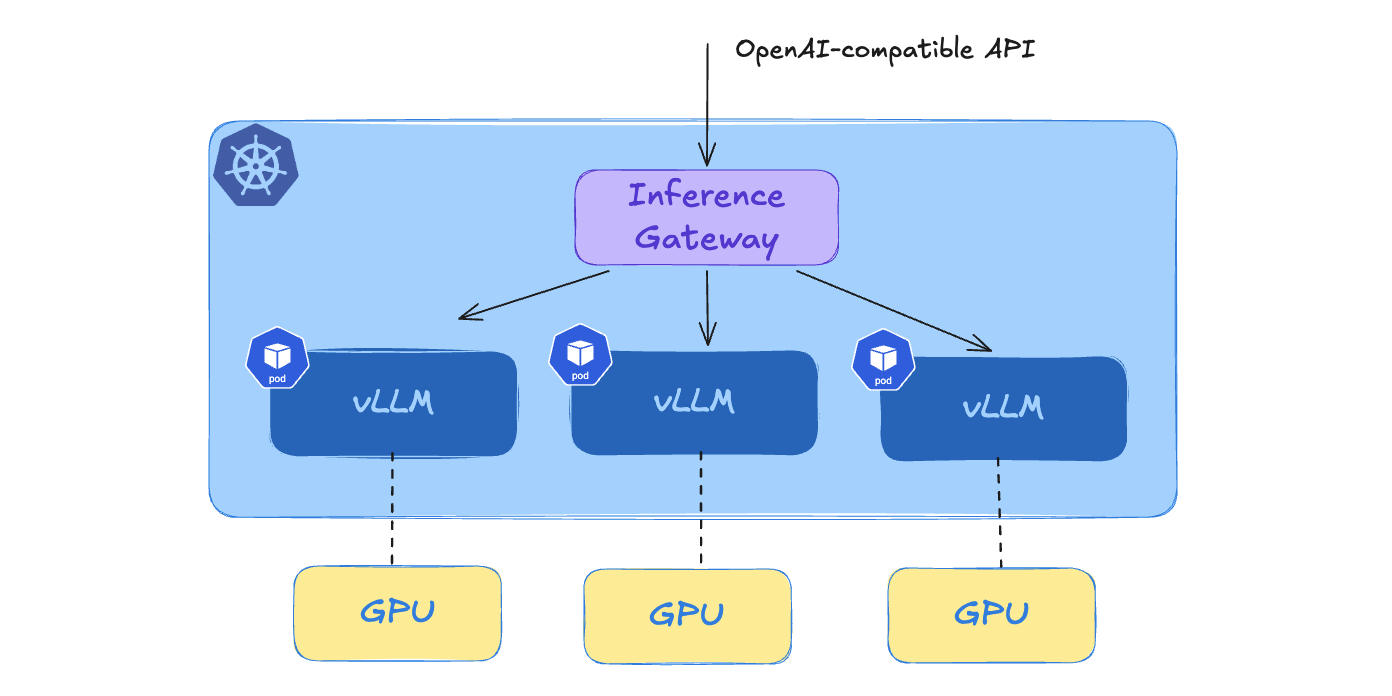
vLLM can be run as a standalone binary, but it is also commonly deployed in one or more Kubernetes Pods. A routing layer can distribute requests among the vLLM replicas. The Gateway API Inference Extension, which we’ll discuss in a future article, adds inference routing capabilities to the Kubernetes Gateway API.
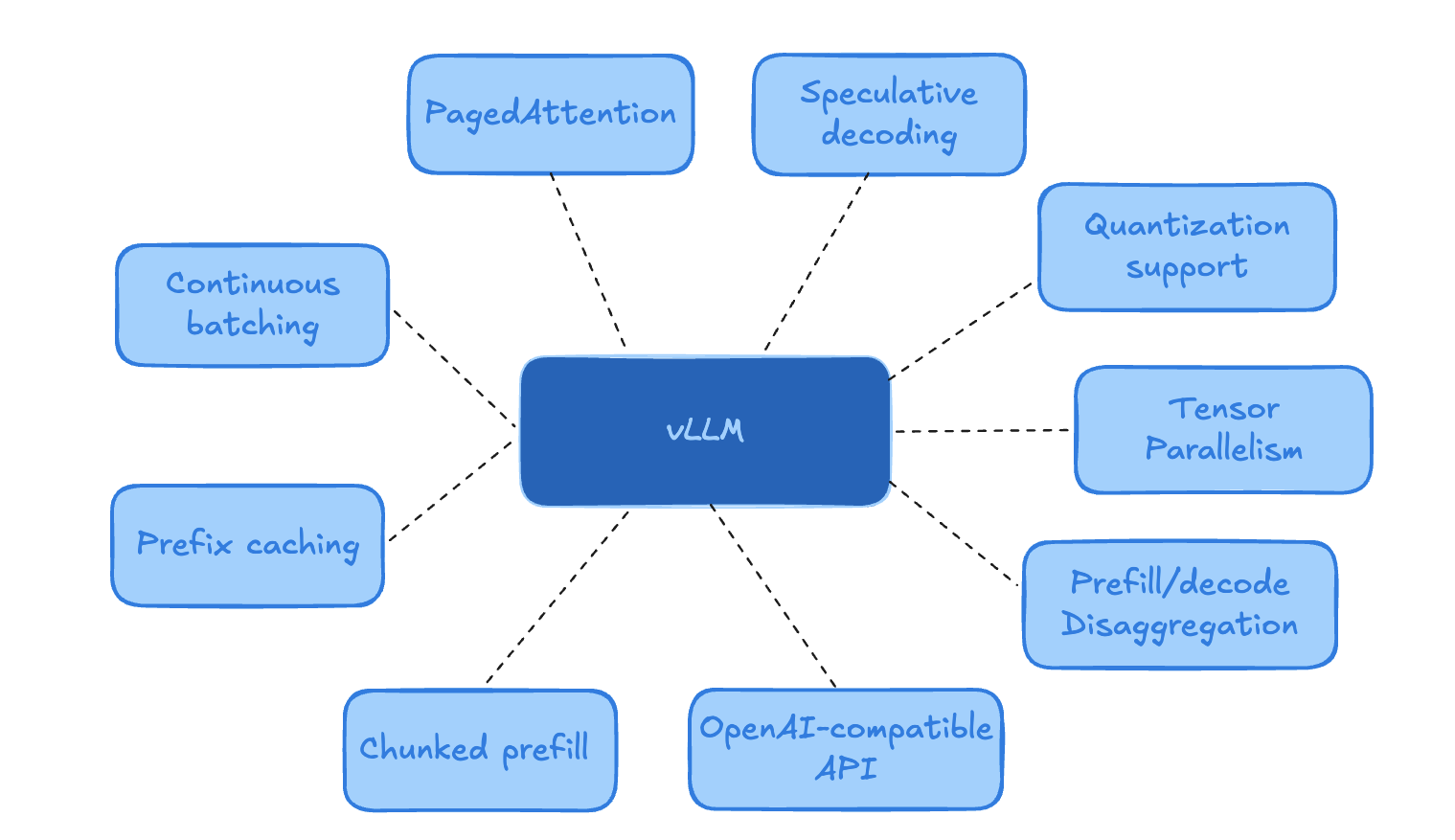
vLLM includes many serving features and optimizations. This article introduces some of the most important ones.
PagedAttention
vLLM’s main innovation is PagedAttention, which improves how the KV cache is stored and managed. Instead of reserving large contiguous memory blocks for each request, vLLM stores KV cache into fixed-size blocks. A request can use blocks that are not physically contiguous in memory. This reduces memory fragmentation and over-allocation, allowing the available KV cache memory to be shared more efficiently among concurrent requests.
Chunked prefill
Prefill can be expensive for long prompts because the model must process the entire prompt before decoding starts. Chunked prefill splits large prefill work into smaller chunks so vLLM can better interleave prefill and decode work.
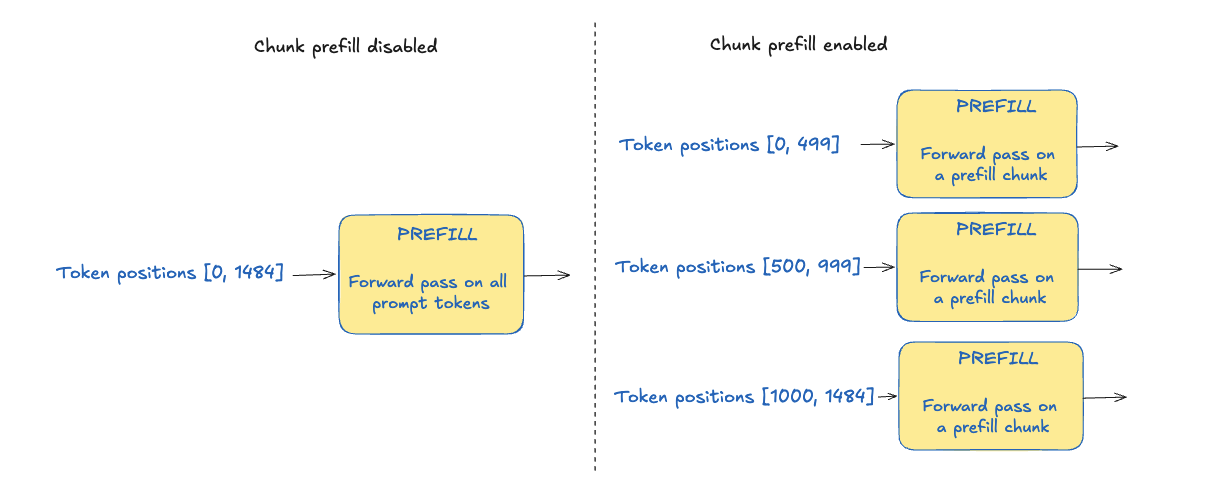
The diagram above illustrates this: instead of processing the 1485 prompt tokens at once, the prefill can be done in 3 sequential forward passes. The first one processes the first 500 tokens, the second one processes the next 500 tokens, and the last one processes the remaining 485 tokens.
- As each token attends to all previous tokens in the sequence, the chunked prefill operation must be done in order. For example, the prefill in charge of token positions 1000 to 1484 cannot be done before the prefill related to token 0 to 499
- In recent vLLM versions, chunked prefill is enabled by default, and can be disabled with –no-enable-chunked-prefill
Chunked prefill is interesting because it prevents long prompts from blocking other requests, allowing work to be scheduled with a finer granularity.
Continuous batching
Processing a user’s prompt requires two steps:
- prefill processes the entire prompt and generates the KV Cache for each token for each layer
- decode generates the next token, one at a time
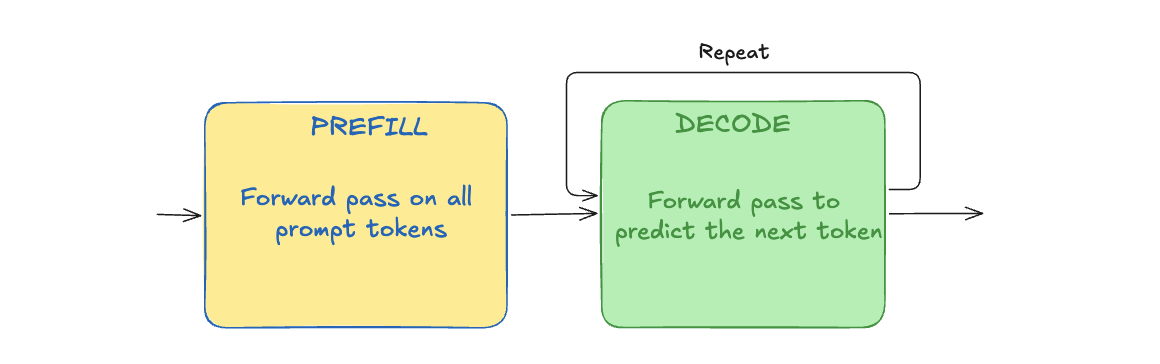
A single user request may need a lot of forward passes though:
- one for the prefill step, or several if chunked prefill is enabled
- hundreds, or even thousands, to generate all the next tokens which, all together, make the LLM’s reply
Inference engines, such as vLLM, repeatedly construct and execute batches, each batch being a single forward pass operation. Before each batch, the scheduler selects work from the active and waiting requests. One batch may contain prefill tokens for some requests and decode tokens for other requests.
After a batch is completed, the scheduler creates the next one. Finished requests are removed, ongoing requests may have their next token decode step, and new requests may have a first prefill chunk executed.
This is even more effective when used with Chunked Prefill, as the scheduler can place decode and smaller prefill in the same iteration.
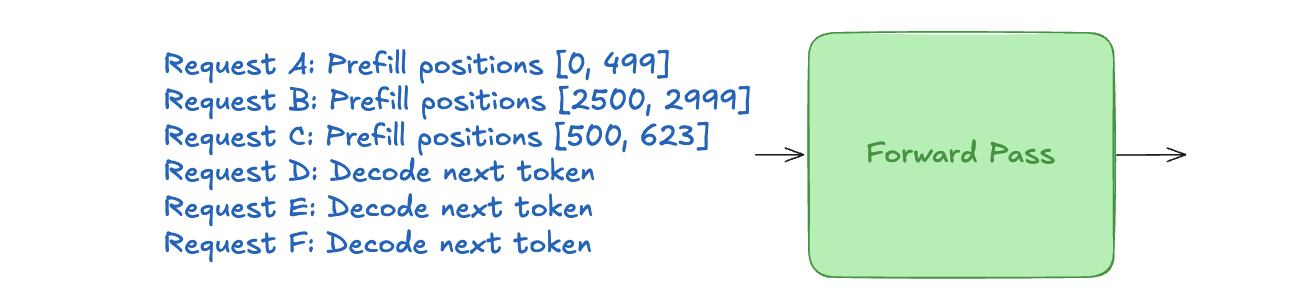
Continuous batching refers to this repeated process. It keeps the GPU busy and improves the throughput: the number of tokens or requests the system can process per second.
Prefix caching
When several requests begin with the same token sequence, vLLM can reuse KV cache blocks previously computed for that common prefix. Only the remaining request-specific tokens need to be processed during prefill.
For example, an AI application can configure a system prompt to define the LLM’s overall behavior and instructions, while the user prompt contains the user’s request or question. The system prompt is prepended to the user’s prompt and is included in the context sent to the LLM. vLLM can reuse the KV cache block already computed for that system prompt, avoiding recomputation of the same prefix.
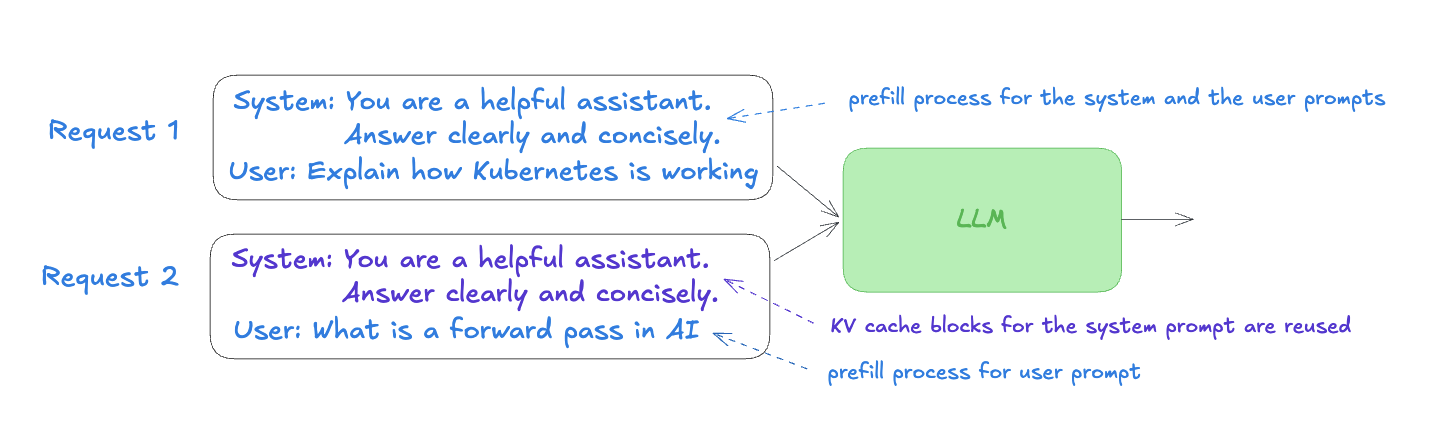
The optimization reduces the prefill cost and improves latency for repeated or similar prompts.
OpenAI-compatible API
vLLM’s OpenAI-compatible API allows many applications and OpenAI client libraries to use a self-hosted model by changing little more than the endpoint, credentials, and model name. This makes it easier to switch between a hosted OpenAI-compatible endpoint and a model served by your own infrastructure.
The Python code below only needs the URL of the vLLM server exposing the Qwen/Qwen3.5-9B model.
from openai import OpenAI

client = OpenAI(
    base_url="VLLM_ENDPOINT",
    api_key="KEY",
)

response = client.chat.completions.create(
    model="Qwen/Qwen3.5-9B",
    messages=[{"role": "user", "content": "What is Kubernetes?"}],
)
Quantization support
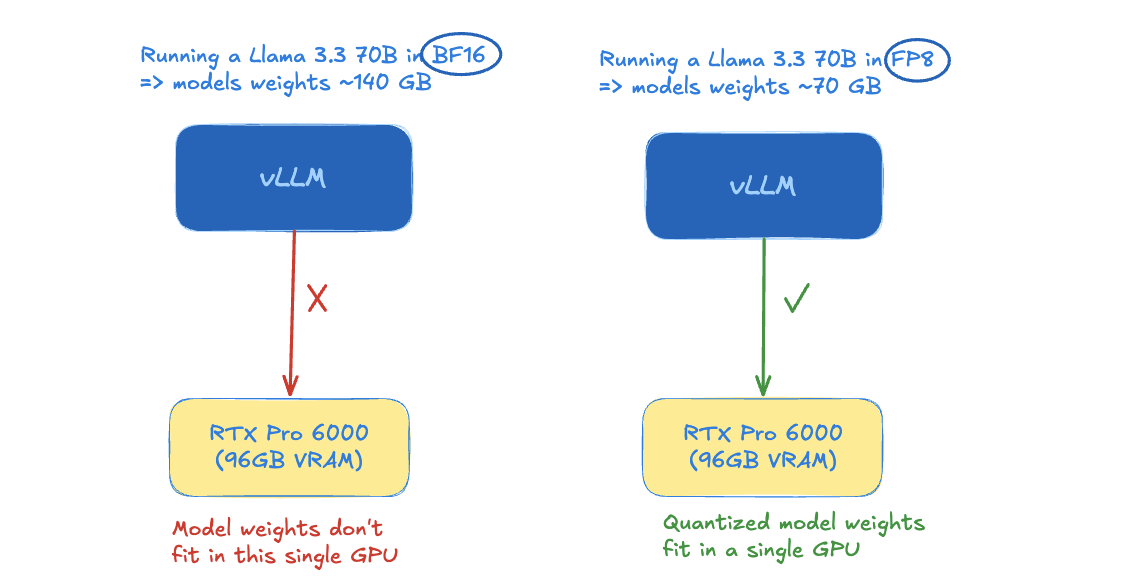
vLLM supports several quantization methods depending on the model and hardware. This is important as it reduces memory usage, allowing larger models to fit on the GPU.
Tensor parallelism
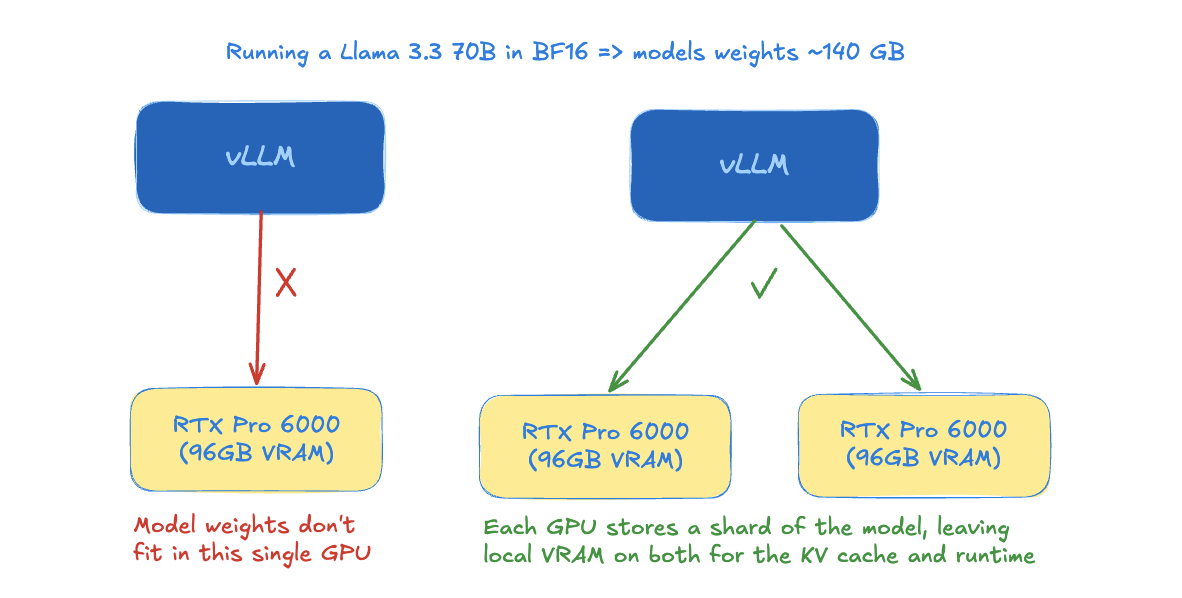
vLLM can run models across multiple GPUs using techniques such as tensor parallelism. If a model is too large to fit on a single GPU, it can be split across several GPUs, so each GPU computes a part of the operation and exchanges results during inference.
Speculative decoding
Speculative decoding uses a method that proposes several tokens, that the main model then verifies. Using a smaller draft model is one possible approach. It can reduce the inter-token latency.
Prefill decode disaggregation
Prefill/decode disaggregation is an advanced architecture, not specific to vLLM, in which the prefill and decode phases are handled by separate workers. This decouples two operations which have different performance characteristics: prefill is generally compute-bound, while decode is generally memory-bound.
Key takeaways
vLLM is a high-throughput, memory-efficient inference and serving engine, widely used to serve LLMs. Among its features are PagedAttention, continuous batching, chunked prefill, and prefix caching which help it serve concurrent requests with better memory usage and throughput.
vLLM on Kubernetes explains how to deploy vLLM on a GPU-enabled Kubernetes cluster.