Tool Calling
Large language models generate text. Tool calling gives a model a way to request that an application executes a function, allowing it to retrieve information or perform actions beyond what it learned during training.
What it is
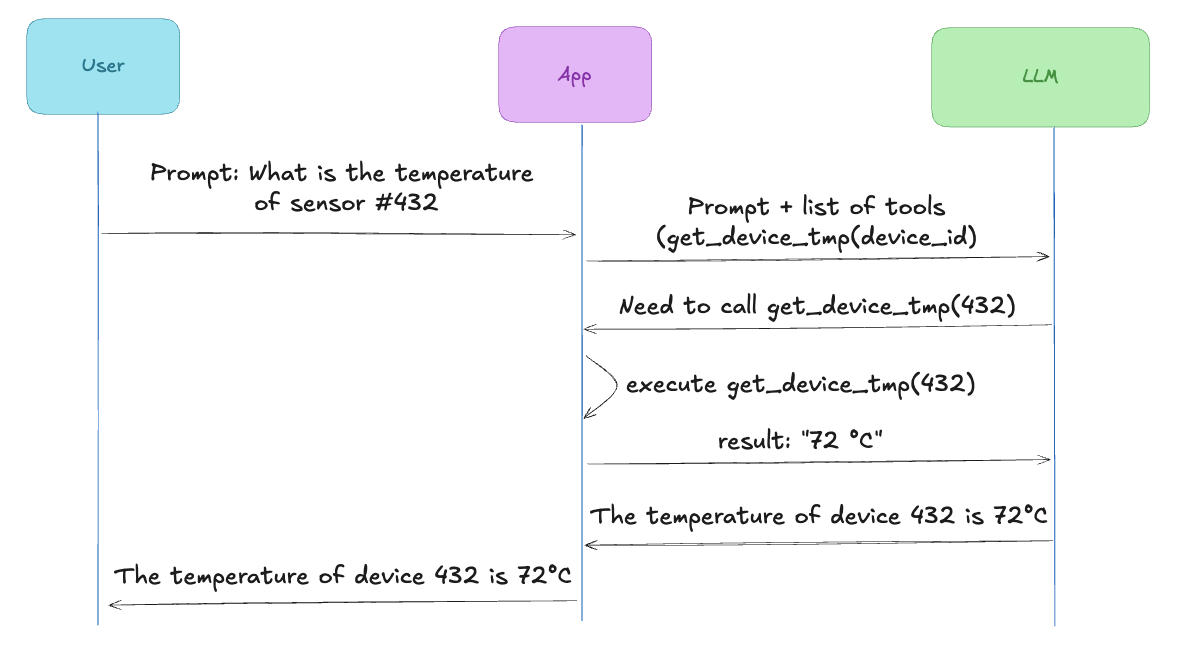
When an application sends a request to an LLM, it can attach a list of available tools. Each tool is a function description: its name, what it does, and what parameters it takes. The model reads these descriptions and decides whether to call one before answering.
The model does not execute the function itself. Instead, it produces a structured response indicating which function needs to be called and with which arguments. The application receives this request, executes the function, sends the result back to the model, and asks it to continue generating the response.
The model never runs code. It only decides when a tool should be called and with what arguments.
Also, the model can decide not to call any tool if it determines that it already has enough information to answer the user’s request.
Example
Let’s say we build an application that monitors IoT devices. We can define a tool called get_device_temperature which takes the ID of an IoT device and returns its current temperature.
First, we describe the tool:
tools = [
    {
        "type": "function",
        "function": {
            "name": "get_device_temperature",
            "description": "Get the current temperature of a given device",
            "parameters": {
                "type": "object",
                "properties": {
                    "id": {
                        "type": "string",
                        "description": "The device identifier name"
                    }
                },
                "required": ["id"]
            }
        }
    }
]
The application sends the list of tools (only one here) alongside the user message:
response = client.chat.completions.create(
    model="...",
    messages=[{"role": "user", "content": "What is the temperature of device 432?"}],
    tools=tools,
)
The model responds with a tool call instead of a text answer:
{
  "tool_calls": [{
    "function": {
      "name": "get_device_temperature",
      "arguments": "{\"id\": \"432\"}"
    }
  }]
}
The application runs the function and sends the result back:
result = get_device_temperature("432")

messages.append({"role": "tool", "content": result})

final_response = client.chat.completions.create(
    model="...",
    messages=messages,
)
The exact message format depends on the API, but the idea is always the same: execute the requested function, then send the result back to the model.
The model now has the data it needs and generates the final answer.
Tool calling vs RAG
Tool calling and RAG (Retrieval Augmented Generation) solve different problems. RAG retrieves documents to enrich the model’s context, while tool calling lets the model ask the application to perform an action or retrieve information from an external system. The two techniques are often used together.
Key takeaways
Tool calling allows an LLM to interact with external systems through the application hosting it. Instead of relying only on the knowledge acquired during training, the model can request actions such as querying a database, calling an API, reading a file, or interacting with another service before generating its final answer.