RAG
Large language models are trained on vast amounts of text, so they know a lot. However, their knowledge has a cutoff date and does not include your private data.
RAG (Retrieval-Augmented Generation) is one of the most widely used techniques to address both limitations. Instead of relying only on what the model learned during training, RAG retrieves relevant information at query time and uses it to enrich the prompt before sending it to the model.
The problem RAG solves
Imagine asking an LLM a question about your company’s internal documentation, or about an event that happened last week. The model cannot answer accurately because it has never seen that information. You have three options:
Prompting, paste the relevant text directly into the prompt. This works for small amounts of information, but does not scale.
Fine-tuning, retrain the model on your data. This is an expensive and slow process, better suited for teaching the model a new behaviour than new facts. A common misconception is that fine-tuning is how you make a model “know” your data, but it’s more about adjusting the model’s weights for teaching it how to respond (format, tone, domain vocabulary) instead of injecting specific facts.
RAG, retrieve the relevant pieces of information at query time and inject them into the prompt. This is scalable and cost-effective.
If your goal is to make an LLM answer questions about external documents without retraining it, RAG is usually the right solution.
How RAG works
The RAG pipeline has two distinct phases: indexing (done once, or periodically) and retrieval (done at query time).
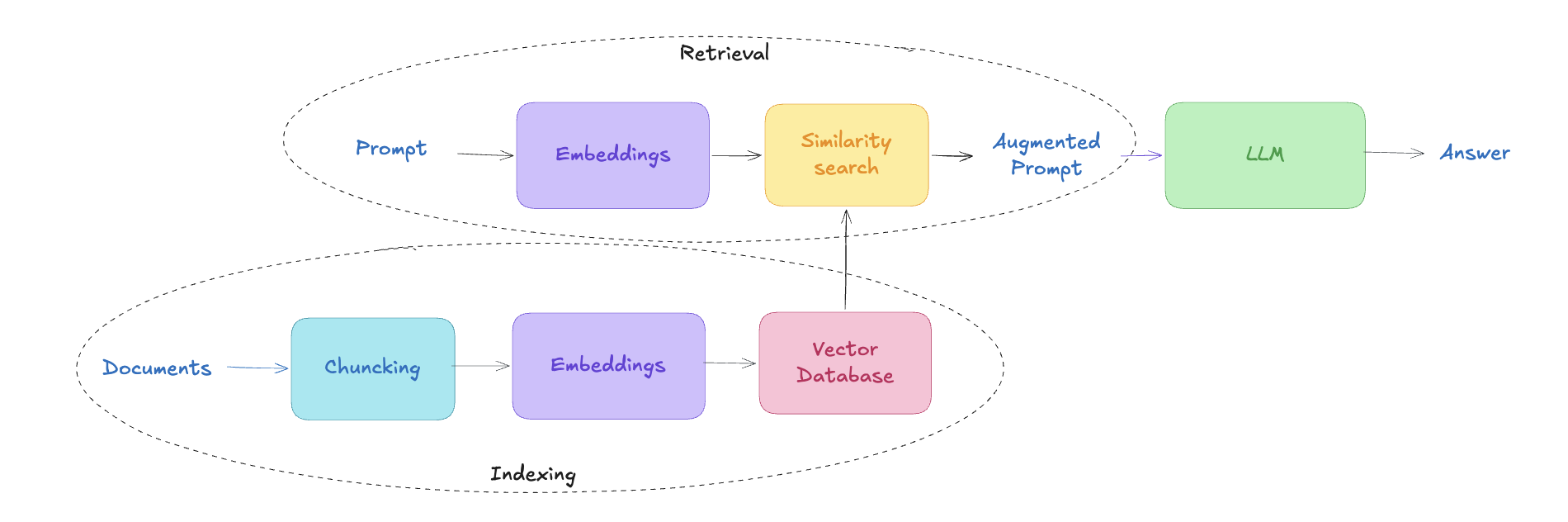
Indexing phase
Before you can retrieve anything, you need to prepare your documents.
1. Chunking
Documents are split into smaller pieces called chunks. A typical chunk is a few hundred tokens, often with some overlap between consecutive chunks to avoid cutting sentences at awkward points, and to preserve meaning.
2. Embedding
Each chunk is converted into a vector that represents its meaning. This is done by an embedding model, a neural network trained specifically to map text to a high-dimensional space where semantically similar texts land close to each other. The actual numbers in the vector are not human-readable; what matters is the distance between vectors.
3. Vector store
The vectors, together with the original text they represent, are stored in a vector database, a system optimised for similarity search (such as pgvector, or OpenSearch).
Query phase
When a user asks a question:
1. Embed the query
The question is converted into a vector using the same embedding model used during indexing.
2. Similarity search
The vector database searches for the chunks whose vectors are closest to the query vector. This is typically done using cosine similarity or dot product. The result is the top-k most relevant chunks, where k is a parameter you control (typically 3–10).
3. Augmented prompt
The retrieved chunks are inserted into the prompt alongside the original question, usually in a template like:
Use the following context to answer the question.

Context:
{retrieved chunks}

Question: {user question}
Answer:4. Generation
The LLM generates an answer based on both its training knowledge and the retrieved context. Because the retrieved information is included in the prompt, the model can answer questions about documents that were never part of its training data.
Key takeaways
RAG is one of the most common techniques used in AI applications today. It allows an LLM to answer questions using external documents without retraining the model. The model still generates the answer, but it does so using both its training knowledge and the retrieved context.
Unlike tool calling, which lets the model request actions from the application, RAG focuses on retrieving relevant documents and injecting them into the prompt before generation. The two techniques are often combined in modern AI applications.