Hugging Face
Every time you deploy a model, either using Ollama, vLLM or another inference engine, that model came from somewhere. Many open-source models are published on Hugging Face.
What Hugging Face is
Hugging Face is a platform that exposes several types of model-related content:
- Models: a hub of hundreds of thousands of pretrained models that can be downloaded and used
- Datasets: data used to train or evaluate models
- Spaces: hosted demos where you can try models directly in a browser
The models hosted on Hugging Face range from small embedding models to large language models, image generators, speech recognition systems, and more.
Finding a model
Hugging Face lets you filter models by:
- the tasks they can accomplish, such as “Text Generation” or “Video classification”
- the license under which they are distributed
- the organization that created them. Well-known publishers include Meta (
meta-llama), Google (google), and Mistral AI (mistralai)
Reading a model card
A model repository has a model card, which usually provides information about the model, how it was trained, what it can do, and how to use it. The screenshot below is the Hugging Face card for Qwen/Qwen3.5-9B.
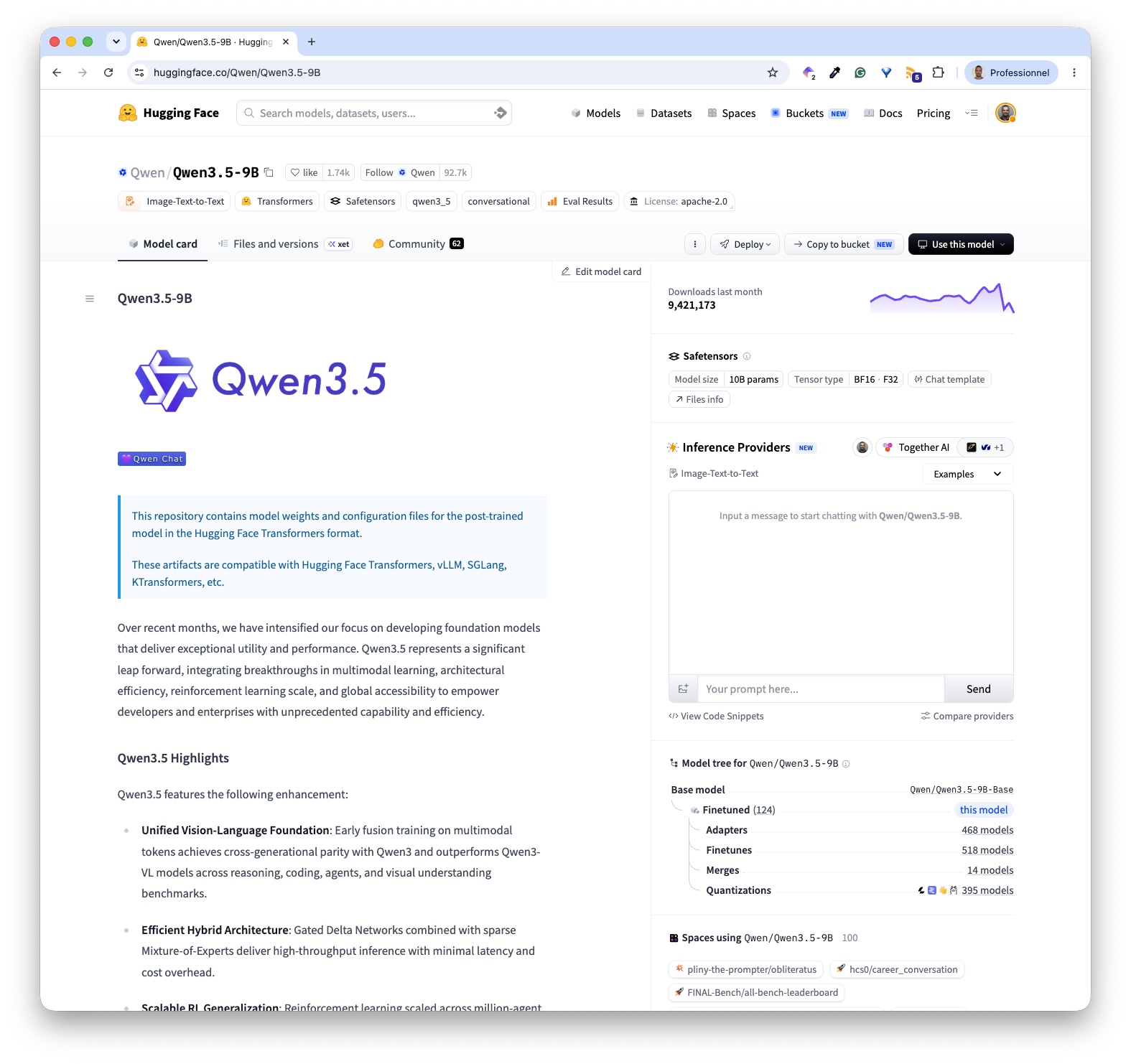
The main pieces of information to check in a model card are:
- the model size, which is the number of parameters, often counted in billions
- the tensor type, which indicates the data type to store the model tensors. For example, BF16 stores each value using 2 bytes, or 16 bits. Lower precision format such as FP8 can reduce the memory needed to store the model’s weights
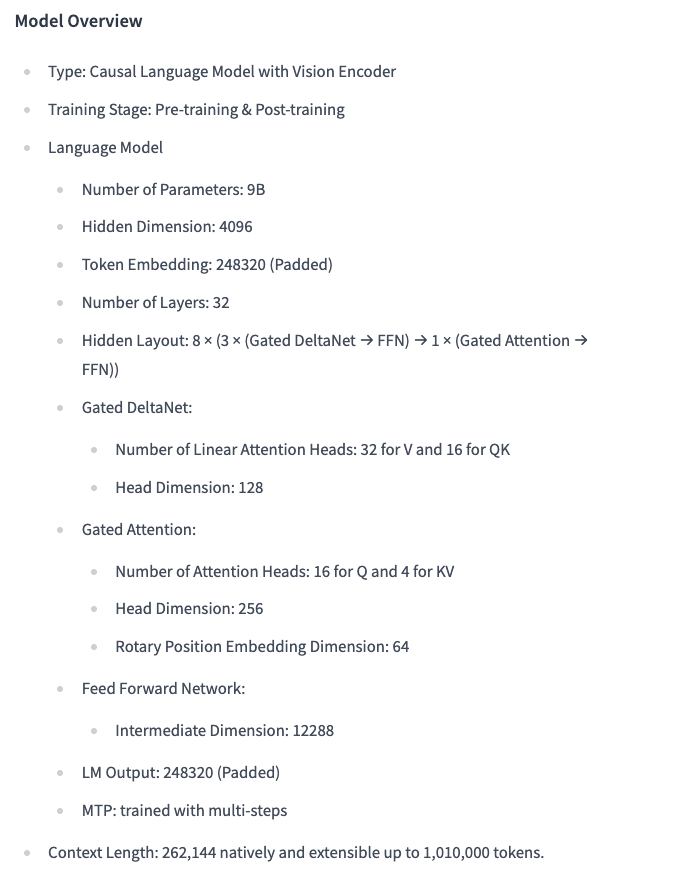
- the context length, which indicates the maximum number of tokens the model can process in one sequence
- the license information
- the intended use, so you know what kinds of tasks the model is designed for
If you want to know more about the model’s internals, the card may also provide an overview of the model, including the number of layers, the vocabulary size, and other details.
If you need to go one step further, you can also inspect the files that compose a model repository.
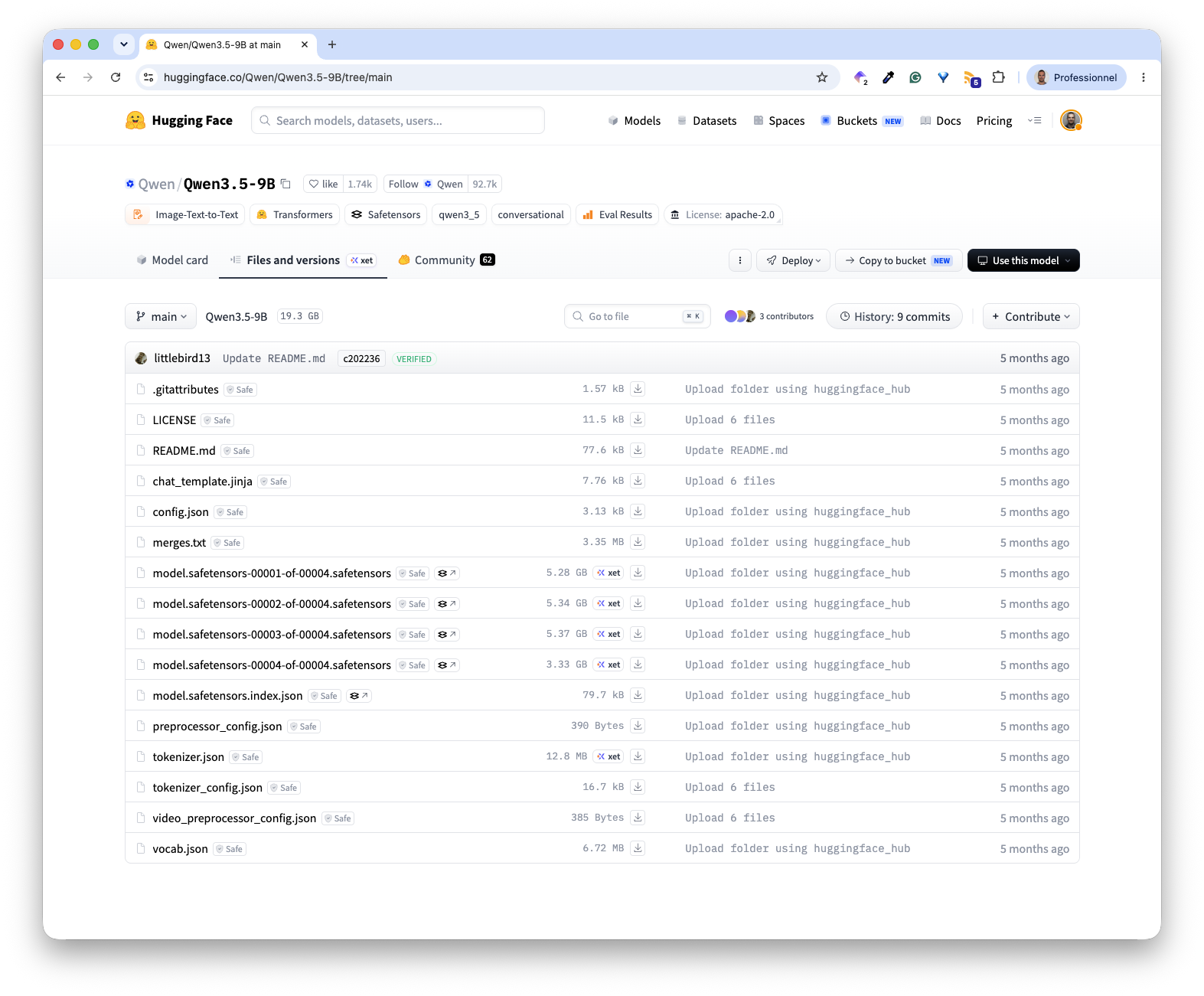
The screenshot above shows that the model’s weights are split across four Safetensors files, each several GB in size. The repository also contains the model configuration, tokenizer files, vocabulary, chat template, and an index describing how the weights are distributed across the four files.
Downloading models
With the CLI
The hf CLI tool is the simplest way to download a model. It can be installed with:
pip install huggingface_hubThe following command downloads a full model into a local directory:
hf download HuggingFaceTB/SmolLM2-135M --local-dir ./smollmYou can also download only a subset of the repository. For example, the following command only downloads the model’s weights files.
hf download qwen/qwen3.5-9B --include "*.safetensors" --local-dir ./qwenMost models are public and require no account. Some require accepting a license agreement on the website before downloading. For those, you need to authenticate first:
hf auth loginWith the Python library
The huggingface_hub library gives programmatic access to the same functionality:
from huggingface_hub import snapshot_download

snapshot_download(
    repo_id="HuggingFaceTB/SmolLM2-135M",
    local_dir="./smollm"
)
This is useful when you need to automate downloads as part of a pipeline or initContainer.
Model formats
Models on Hugging Face can be published in different formats depending on the runtime they target. Two formats are often encountered:
- safetensors is a commonly used format for storing model weights. It is supported by frameworks and inference engines such as Transformer and vLLM
- GGUF is a single-file format commonly used by llama.cpp-based runtimes. Models distributed in GGUF are often quantized to reduce their size